Hypertext Markup Language (HTML)- is the standard language for documents designed to be displayed in a web browser. It can be assisted by technologies such as Cascading Style Sheets (CSS) and scripting languages such as JavaScript.
Web browsers receive HTML documents from a web server or from local storage and render the documents into multimedia web pages. HTML describes the structure of a web page.
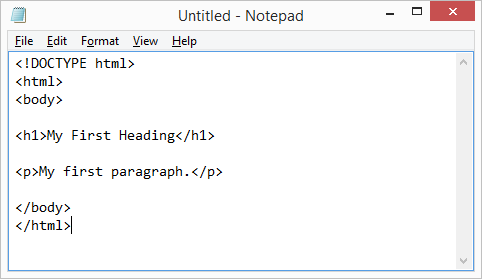
Cascading Style Sheets (CSS)- is a web based language used for describing the presentation of HTML. CSS is a cornerstone technology of the World Wide Web, alongside HTML and JavaScript.
CSS is designed to enable the separation of presentation and content, including layout, colors, and fonts. This separation can provide more flexibility and control in the presentation of a web page and reduce complexity and repetition in the structural content (HTML code).
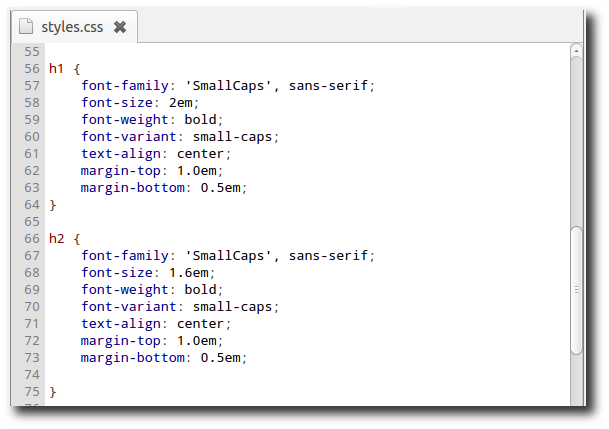
Javascript- Alongside HTML and CSS, JavaScript is one of the core coding languages of the World Wide Web. JavaScript enables interactive web pages and is an essential part of web applications. The vast majority of websites use it, and major web browsers have a dedicated JavaScript engine to execute it.
Web browser- (commonly referred to as a browser) is a software application for accessing information on the World Wide Web. Each individual web page, image, and video is identified by a distinct URL (Uniform Resource Locator), enabling browsers to retrieve these resources from a web server and display them on a user’s device.
A web browser is not the same thing as a search engine, though the two are often confused. To connect to a website’s server and display its web pages, a user must have a web browser installed on their device.
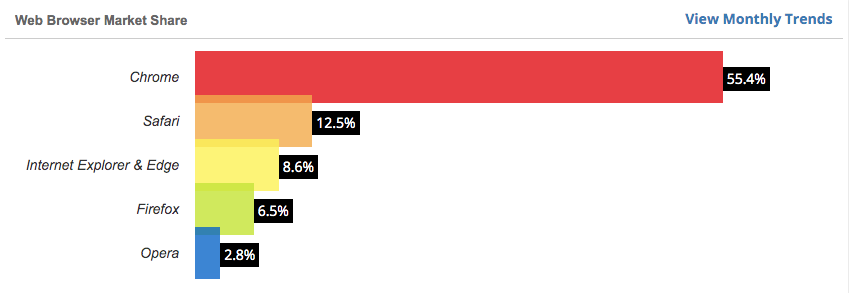
As of March 2019, more than 4.3 billion people use a browser, which is about 55% of the world’s population. The most popular browsers are Chrome, Firefox, Safari, Internet Explorer, Opera, and Edge.
Search Engine- A web search engine or Internet search engine is a software system that is designed to carry out web search (Internet search), which means to search the World Wide Web in a systematic way for particular information entered by the user. The search results are generally presented in a line of results, often referred to as search engine results pages (SERPs). Internet content that is not capable of being searched by a web search engine is generally described as the deep web.

Search engine optimization (SEO)– is the process of increasing the quality and quantity of website traffic by increasing the visibility of a website or a web page to users of a web search engine. SEO refers to the improvement of unpaid results (known as “natural” or “organic” results), and excludes direct traffic/visitors and the purchase of paid placement.
Optimizing a website may involve editing its content, adding content, modifying HTML, and associated coding to both increase its relevance to specific keywords and to remove barriers to the indexing activities of search engines.
As an Internet marketing strategy, SEO considers how search engines work, the computer programmed algorithms which dictate search engine behavior, what people search for, the actual search terms or keywords typed into search engines, and which search engines are preferred by their targeted audience.
SEO is performed because a website will receive more visitors from a search engine the higher the website ranks in the search engine results page (SERP). These visitors can then be converted into customers.
Server- In computing, a server is a computer program or a device that provides functionality for other programs or devices, called “clients”. This architecture is called the client–server model, and a single computation is distributed across multiple processes or devices.
Servers can provide various functionalities, often called “services”, such as sharing data or resources among multiple clients, or performing computation for a client. A single server can serve multiple clients, and a single client can use multiple servers.
Types of servers include: database servers, file servers, mail servers, print servers, web servers, game servers, and application servers.

Web hosting- is a service that allows organizations and individuals to post a website or web page onto the Internet. A web host, or web hosting service provider, is a business that provides the technologies and services needed for the website or webpage to be viewed in the Internet. Websites are hosted, or stored, on special computers called servers. When Internet users want to view your website, all they need to do is type your website address or domain into their browser. Their computer will then connect to the server and your webpages will be delivered to them through the browser.
Most hosting companies require that you own your domain in order to host with them. If you do not have a domain, the hosting companies will help you purchase one.
Examples of Web Hosts
Domain Name- Domain names are used to identify one or more IP addresses. Domain names are used in URLs to identify particular Web pages. For example, in the URL http://www.pcwebopedia.com/index.html, the domain name is pcwebopedia.com.
Every domain name has a suffix that indicates which top level domain (TLD) it belongs to. There are only a limited number of such domains.
For example:
gov – Government agencies
edu – Educational institutions
org – Organizations (nonprofit)
mil – Military
com – commercial business
net – Network organizations
ca – Canada
th – Thailand
The only way to register and start using a domain name is to use the services of a domain name registrar.
The registrar you choose will determine the cost for registering a domain name, but in general expect to pay a yearly fee. Some registrars will offer discounts if you register for more than one year, but no registrar has the authority to sell more than a 10-year registration contract for any domain name. The registrar can cancel a contract and resell the domain name if it cannot contact an actual person to settle legal issues that may arise.
There are many laws that regulate the registration of domain names, such as registering a copyrighted name or registering a domain name for the sole purpose of blocking someone else from using it. Check with your domain name registrar for the laws that affect how you register your domain name. If you want to create a domain name and are not sure if it has already been taken, you can check a whois server that keeps track of all the registered domain names.
Examples of Domain Registration Companies:




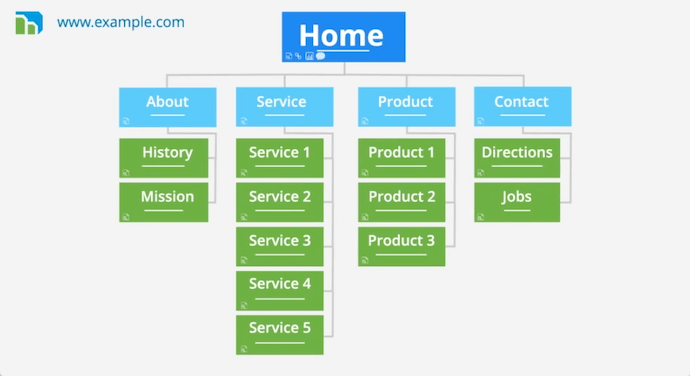
Site map (or sitemap)- is a list of pages of a web site. It is important to organize web site pages in ways that make sense. When building a website it is a good idea to map out how you want your website to be structured. Building a sitemap is a beginning step for website construction. Sitemaps can get very complicated for large websites.
Example of a sitemap below:
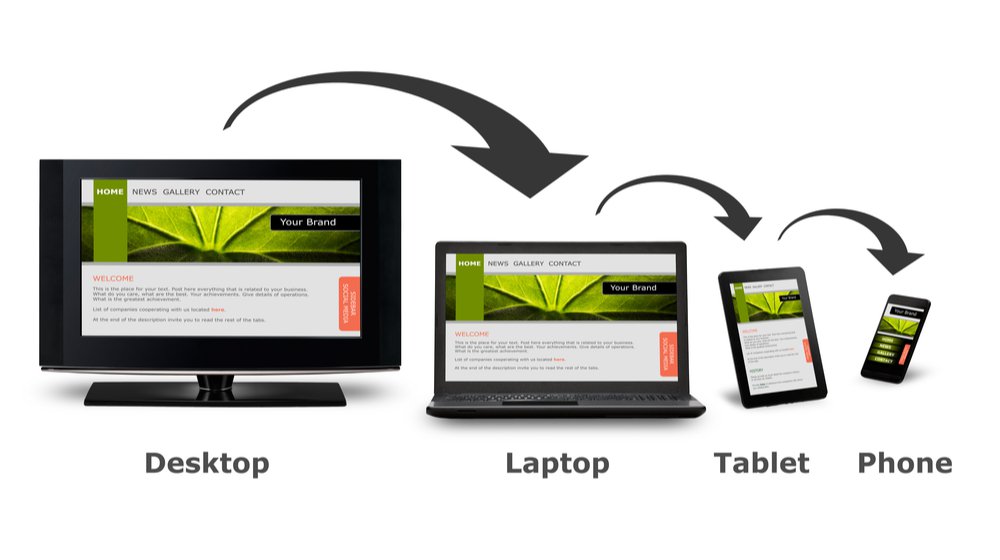
Responsive Web Design (RWD)- is an approach to web design that makes web pages render well on a variety of devices and window or screen sizes. A site designed with RWD adapts the layout to the viewing environment by using fluid, proportion-based grids, flexible images, and CSS3 media queries, an extension of the @media rule.
Responsive layouts automatically adjust and adapt to any device screen size, whether it is a desktop, a laptop, a tablet, or a mobile phone. Responsive web design has become more important as the amount of mobile traffic now accounts for more than half of total internet traffic.
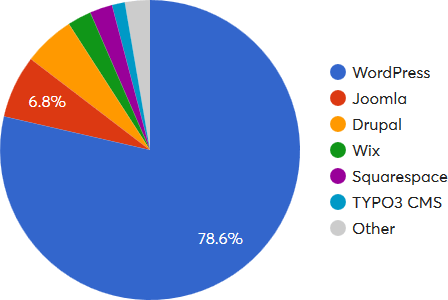
Web Content Management System (WCM or WCMS)– is a software content management system (CMS) specifically for web content. It provides website authoring, collaboration, and administration tools that help users with little knowledge of web programming languages or markup languages create and manage website content. WCMS usually provide template based websites which are customizable to the web developer.
Web Accessibility- Web accessibility is the inclusive practice of ensuring there are no barriers that prevent interaction with, or access to, websites on the World Wide Web by people with disabilities. When sites are correctly designed, developed and edited, generally all users have equal access to information and functionality.
For example, when a site is coded with semantically meaningful HTML, with textual equivalents provided for images and with links named meaningfully, this helps blind users using text-to-speech software and/or text-to-Braille hardware. When text and images are large and/or enlargeable, it is easier for users with poor sight to read and understand the content. When links are underlined (or otherwise differentiated) as well as colored, this ensures that color blind users will be able to notice them. When clickable links and areas are large, this helps users who cannot control a mouse with precision. When videos are closed captioned or a sign language version is available, deaf and hard-of-hearing users can understand the video. When flashing effects are avoided or made optional, users prone to seizures caused by these effects are not put at risk. When sites are correctly built and maintained, all of these users can be accommodated without decreasing the usability of the site for non-disabled users.
The needs that Web accessibility aims to address include:
Visual: Visual impairments including blindness, various common types of low vision and poor eyesight, various types of color blindness;
Motor/mobility: e.g. difficulty or inability to use the hands, including tremors, muscle slowness, loss of fine muscle control, etc., due to conditions such as Parkinson’s disease, muscular dystrophy, cerebral palsy, stroke;
Auditory: Deafness or hearing impairments, including individuals who are hard of hearing; Seizures: Photo epileptic seizures caused by visual strobe or flashing effects.
Cognitive and intellectual: Developmental disabilities, learning difficulties (dyslexia, dyscalculia, etc.), and cognitive disabilities of various origins, affecting memory, attention, developmental “maturity”, problem-solving and logic skills, etc.
World Wide Web Consortium (W3C)- is the main international standards organization for the World Wide Web (abbreviated WWW or W3). Founded and currently led by Tim Berners-Lee, the consortium is made up of member organizations which maintain full-time staff for the purpose of working together in the development of standards for the World Wide Web. The W3C also engages in education and outreach, develops software and serves as an open forum for discussion about the Web.
W3Schools- is an educational website for learning web technologies online. Content includes tutorials and references relating to HTML, CSS, JavaScript, JSON, PHP, Python, AngularJS, SQL, Bootstrap, Node.js, jQuery, XQuery, AJAX, XML, and Java.
Created in 1998, its name is derived from the World Wide Web, but is not affiliated with the W3C (World Wide Web Consortium). It is run by Refsnes Data in Norway. W3Schools presents thousands of code examples. By using the TryIt editor, readers can edit examples and execute the code in a sandbox.
Types of Web Designers/ Developers
Front-End Developer Vs. Back-End Web Development
Visual Designers- Visual design focuses on the aesthetics of a site and its related materials by strategically implementing images, colors, fonts, and other elements. A successful visual design does not take away from the content on the page or function. Instead, it enhances it by engaging users and helping to build trust and interest in the brand.
Interaction design– is a process in which designers focus on creating engaging web interfaces with logical and thought out behaviors and actions. Successful interactive design uses technology and principles of good communication to create desired user experiences.
The field of Interaction Design is often broken into five pieces:
- Human/machine communication is the translation of conversations between the device and user.
- Action/reaction looks at how interactions happen and unfold.
- State ensures that users know what is happening and why in terms of the application.
- Workflow ensures that users know who to use a tool or application and what happens next.
- Malfunction takes into account mistakes that are bound to happen.
Further, there are certain considerations to keep in mind when creating design interactions. Usability.gov offers basic questions in six different categories that can help shape how the design comes together.
- What can a user do with their mouse interaction, finger or stylus to directly interact with the interface?
- What commands can a user give to interact with the interface?
- What about the appearance gives the user a clue about how it functions?
- What information do you provide to let a user know what will happen before they perform an action?
- Are there constraints to help prevent errors?
- Do error messages provide a way for the user to correct the problem?
- What feedback does a user get when an action is performed?
- What is the response time between an action and response?
- Are the interface elements a reasonable size to interact with?
- Are edges and corners strategically being used to locate interactive elements?
- Are you following standards?
- Is information chunked into a few items at a time?
- Is the user end as simple as possible?
- Are familiar formats used?
UX (User Experience) Design vs. UI (User Interface) Design
CMS or WCMS (Web Content Management System) Specialist- Designer that specializes in using WCMS systems (such as WordPress) to create websites.

